Welcome to our store!



We are sorry to announce that Beta75X (12A ESC) is discontinued and will not be available for sales anymore. We recommend you buy its great alternativeBeta75X HD Digital VTX.USA frequency table below. The frequency in red item is invalid.This is a new era
We are sorry to announce that Beta75X (12A ESC) is discontinued and will not be available for sales anymore. We recommend you buy its great alternativeBeta75X HD Digital VTX.
USA frequency table below. The frequency in red item is invalid.
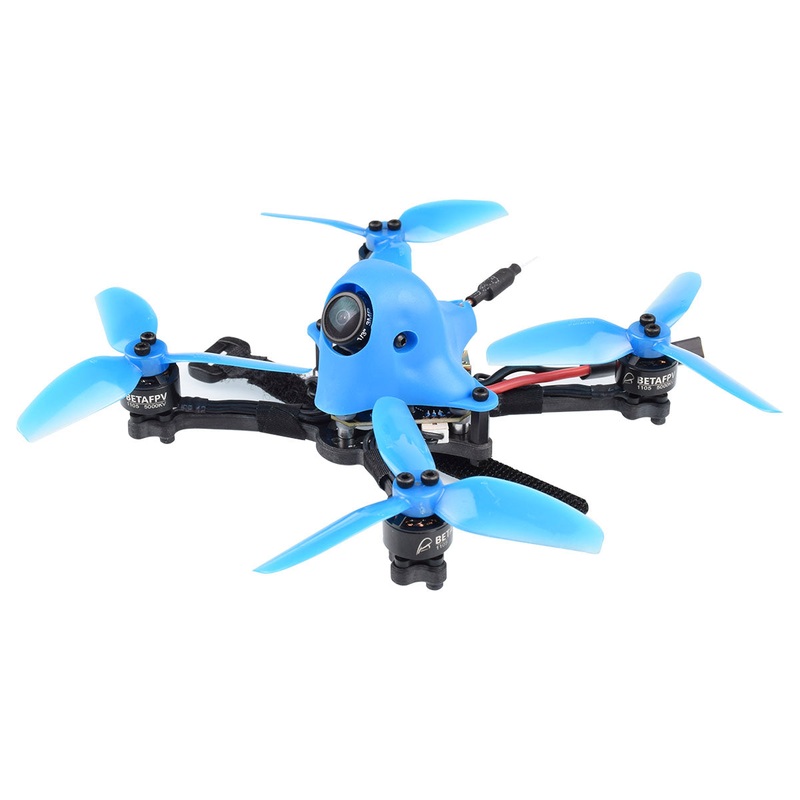
This is a new era for Whoop drones.2S Whoop drone has the power to fly real acro, like a larger quad, but is still small enough, safe enough, and quiet enough to fly anywhere. At this moment, the ESC board is updated to 12A. Supports 2S-3S battery now.
So now we have 3 versions for your choice -Beta75X 2S, Beta75X 3S, Beta75X HD.
Parts Updated
For 75mm brushless whoop drones, there are 3 versions for your choice –Beta75X 2S,Beta75X 3S,Beta75X HD.
BETA75X (TBS Crossfire Version ) is now ON SALES.Let’s see the Epic Dive Video by Wayne Ho !!
A detailed review of the Beta75X drone byNate Payneon YT.
See how fast the 2S whoop drone is. Video byDaniel Sugano.
Another overview and flight video byBrenden Guffin.
For more video about these 2S Whoop drone, please check here:
More Overview Videos
Have any questions about 2S Whoop drone, please join our group on Facebook:
2S POWER-WHOOP GROUP
Join the online discussion about 2S Whoop drones at RCGroups.com:
Beta65X Beta75X
The big brother Beta75X is available too.Get a Beta65X here.
FC SPECIFICATIONS
Find more details about this 2S F4 FC board in another page.
ESC SPECIFICATIONS
Find more details about this2S ESC boardin another page.
Z02 AIO Camera VTX
Find more details about this AIO Z02 camera VTXin another page. On the Beta75X, it is the customed version with VTX board and camera board split.
The Beta75X drone comes with “props out” in default. Why we need “props out” direction?
Default Betaflight props direction, quadcopterdips and “washes out” in hard corners.With reversed props or “props out”, no more dipping even in hardest cornering.
Know more about “Props Out”.
There are 2 choices for the Beta75X battery. For the best performance, we recommend a 2S 350mAh battery with XT30 connector. If you already have many 1S whoop style batteries and want to use them on the Beta75X drone, then we also provide a PH 2.0 option for you. The two 300mAh Lipo HV 1S batteries can be inserted into the slot with the help of an adapter, as seen below.
The AIO camera VTX on the Beta75X is a customized version of Z02. The VTX board and camera board are split and 35 degree camera mount for more fast flying. At the same time, it have all the other function of the Z02 camera, like output power switchablebetween0mW, 25mW and 200mW. Smart audio is available for VTX remote control in default.
How tochange the frequency or output power via remote control, please check the manual Smart Audio.
Download the STL file for the camera mount.
1. Update about the LED at the rear for Beta75X
The FC board is now upgraded to V1.2. It can support programable LED likeWS2812 etc. The LED holder is designed on the 75X frame nowadays.
Note:there is NO rear LED holder for Beta65X in default.
2.I am interested in connecting an HD camera and DVR, but I don’t want to overload the circuit of 5V.
The 5V regulator on the FC board could handle 2A of load. So you could use it for HD camera or DVR board. More details, please check theFC board page.
3. Does this drone have current sensor?
This drone does NOT have a real current sensor.We use the virtual current meter in Betaflight. When properly calibrated, it can be accurate enough to be useful. Here is the pre-calibrated value out of the box.
set current_meter = VIRTUAL
set ibatv_scale = 90
set ibatv_offset = 29
4. How to connect the receiver to the 2S brushless FC?
Please don’t forget to plug the battery when you try to connect the connector to the 2S brushless FC.Find outmore details in our support page.
5. Cli Dump for different versions of the 2S Whoop are provided in our support page.
6. For some reason whenever i turn off and turn back on the quad vtx resets to 25mw even if i save the setting.
The button and SmartAudio cannot be used at the same time. You can either change the vtx setting by button or SmartAudio.
If you only use the button, you can find SmartAudio on the Ports page and set it to Disabled.
If you only use the SmartAudio, you can find more detailshereto know how to do this.
7. ETA of my 2S whoop drones.
We know that you guys can’t wait to get this little monster and want to know about the ETA. Check out the shipping information here.
8.How to set up smart audio vtx control? (Multirotor Guidegives you the most straightforward explanation)



Reviews
There are no reviews yet.