Welcome to our store!


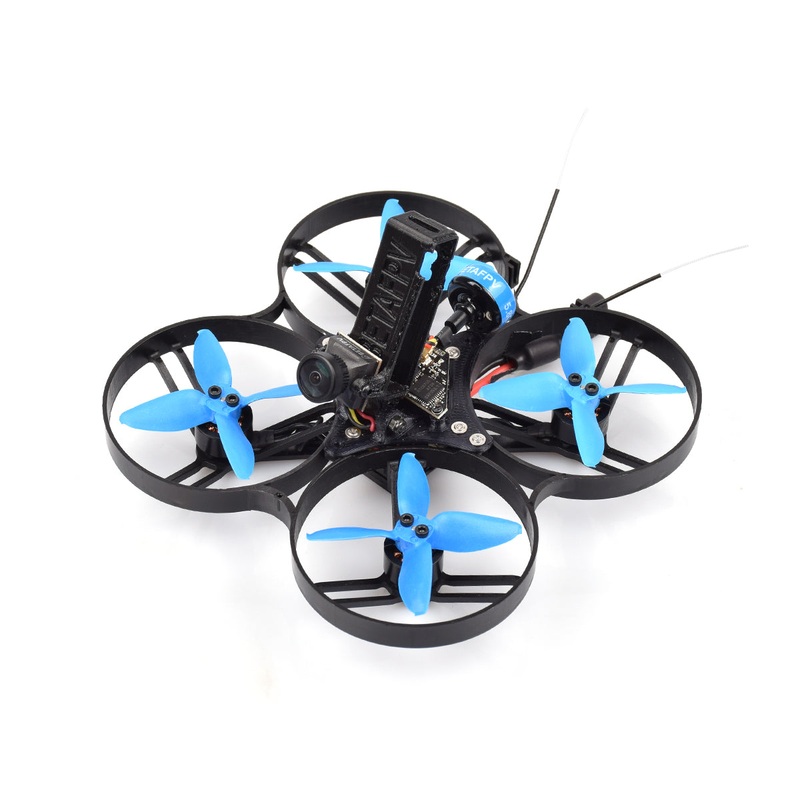
Beta85X Whoop Quad for Naked Camera series is discontinued now, but you can try the new pusher style X-series drone -Beta85X V2.Beta85X is packed with aBECboard, case andadjustable mount for the naked camera, so you can easily build a cinewhoop with thenak
Beta85X Whoop Quad for Naked Camera series is discontinued now, but you can try the new pusher style X-series drone -Beta85X V2.Beta85X is packed with aBECboard, case andadjustable mount for the naked camera, so you can easily build a cinewhoop with thenaked camera and greatly minimize the weight. It flies GREAT on a 450mah 4s battery. You can get a quick and stable flight for about 4 minutes. It’s the best choice for those who are interested in building cinewhoop for FPV filming. We also provide the Beta95X forNaked Cameratoo.
Please note that thenaked cameraand the battery are not including. Click the link here to get the Beta85X FPV.
In recent months, more and more pilots are interested in the super small, lightweight and powerful cinewhoop. PilotslikeRichrd PappandTommy Tibajiastarted their cinewhoop project.Based on the stable and insane power system of Beta85X, Tommy built his Umma85 and keep sharing all his ideas in the group.If you wanna know more about cinewhoop, feel free to join us on Facebook.
>>NAKED Cinewhoop Community
For providing a great combo for FPV community, we design aBEC boardwhich is forthe naked GoPro HERO6 perfectly. With the carbon fiber case and pluggable connector, it is easier toplug in and out. Meanwhile, we designed theadjustable camera mount of 0-50, it can be used for the different flying modes of insane flying or slowing flying.
Based on the discussion of the cinewhoop, we designed a BEC board and a fitting case for Naked GoPro HERO6/7 to make it as a whole GoPro Lite camera. With a pluggable connector and a lightweightof 29g, easier toinstall on your cinewhoop for FPV filming.
So what is the special of the BEC board? It isintegrated with the 5V@2A BEC, thestock GoPro buttons, LED and remote recording, solving the problem of theunstable power supply andredundant FPC connect way. The current BEC board fits for GoPro HERO6 and GoPro HERO7 Black.
Pilot could use the switch on radio transmitter to start/stop record. Some more configuration needed.
For example, if you useF4 FC V2.0in the drone, like the 95X whoop drone, the connection diagram is shown below.The yellow cable (FCB12 pin pad)is just for the remote record.
We use the Pinio function in Betaflight to control record. First, setup the Pinio function of the B12 pin in the FC board.
resource FLASH_CS 1 NONE
resource PINIO 1 B12
set pinio_box = 40,255,255,255
save
Next, map one of the switch channels in your radio transmitter to this Pinio (aka USER1). As shown below, we map the AUX4 channel in the radio transmitter to USER1 Pinio.The cursor in the orange zone means button released and white zone means pressed. So keep the cursor in the orange zone in default.
Third, check if the Pinio function works.Change the switch and make the cursor move from the orange zone to the white zone, and finallyback to the orange zone.Now you could check the LED status to know if the record starts. Use the same process to stop recording.
If you use the12A F4 AIO FCboard, like the 85X whoop drone, you will use the LED_STRIP pin (aka A08 pin pad) for the Pinio function.
resource LED_STRIP 1 NONE
resource PINIO 1 A08
set pinio_box = 40,255,255,255
save
Know more about the Betaflight Pinio function.
We know some of the pilots might have a question abouthowto get the case for the naked camera or some might wanna grab the Naked Camera directly. Here we providesome more choices for your better installation.
Special thanks toJONAH BLAESERwho provided the method ofdisassembling GoPro HERO6/8 Black. If you are interested, please check the link to know the specific steps to make your own naked GoPro.
GoPro HERO6 Black Disassembly Guide
We alsoprovided the method ofdisassembling GoPro HERO8 Black. If you are interested, please check the link.
GoPro HERO8 Black Disassembly Guide
Note:Do this at your own risk. You will lose your GoPros warranty and you may end up bricking thecamera if something goes wrong.This guide is not authorized by GoPro and your camera is not guaranteed to work afterward. will notbe held responsible for this action.
*Please note that the Naked camera and the battery are not including.


Reviews
There are no reviews yet.